How to Connect Allingo as a Carrier on Haravan
Do you have to add every carrier to your store admin one by one just to ship an order? With Allingo, you connect once on Haravan and send orders to many carriers right from the order page.
This guide covers two things: connecting Allingo to Haravan, and creating a shipment through Allingo. The screenshots show the Vietnamese interface. Menu and button names are given in English, with the on-screen Vietnamese label in brackets.
In this guide
- What is Haravan?
- Why connect Allingo to Haravan?
- Connect Allingo on Haravan
- Ship with Allingo through Haravan
- Track your orders
- Cost
- FAQ
1.What is Haravan?
Haravan is a Vietnamese omnichannel selling platform. Sellers use it to build a website, sell on social media, livestream, run physical stores and sell on marketplaces (Shopee, Lazada, TikTok Shop, Tiki), while managing orders, inventory, payments and shipping in one system.
According to Haravan’s homepage, the platform has more than 60,000 customers and integrates 15+ carriers. Haravan is headquartered in Ho Chi Minh City with an office in Hanoi.
2.Why connect Allingo to Haravan?
When you add Allingo to your carrier list, you get:
- One connection, many carriers: send orders to 10+ carriers through a single option in Haravan, instead of adding each carrier separately.
- Choose the carrier by your goal: Tiết kiệm (Save), Nhanh (Fast) or Tối ưu (Balanced: price, speed and delivery success rate).
| Service group | Integrated carriers |
|---|---|
| Standard | GHN, Viettel Post, VNPost, J&T Express, SPX Express, BEST Express, Nhất Tín Logistics |
| On-demand | Xanh SM, Grab Express, Lalamove |
A quick guide to choosing: GHN, J&T, Viettel Post and Nhất Tín handle heavy parcels. Lalamove, Grab and Xanh SM are strong for fast inner-city delivery, and Lalamove supports multiple drop-off points.
3.Connect Allingo on Haravan
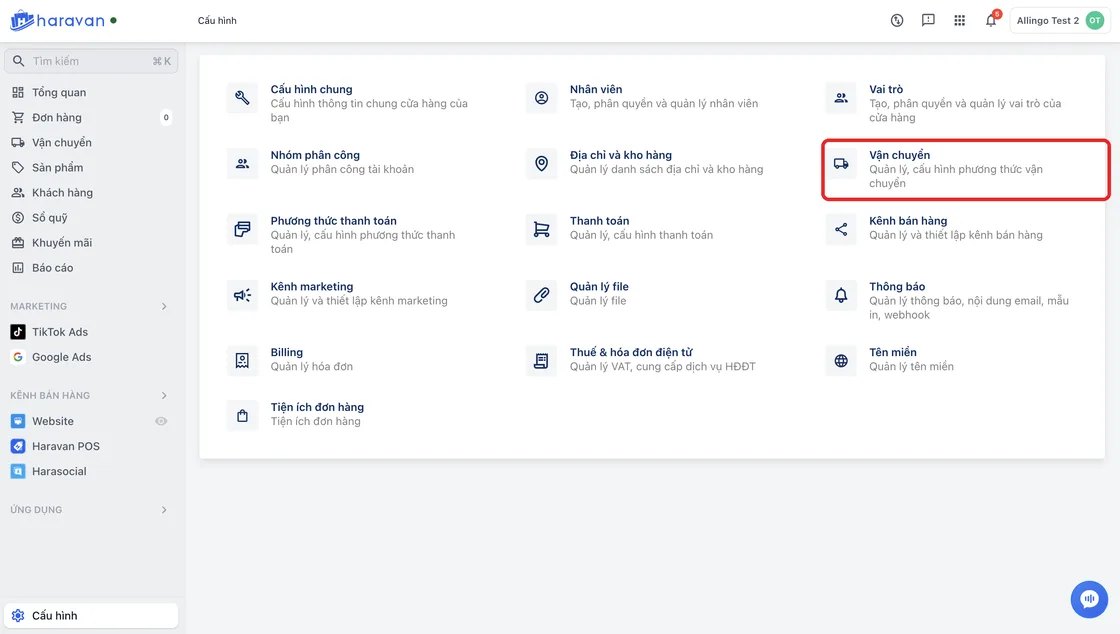
Step 1: Go to Settings → Shipping
In your Haravan admin, open Settings (Cấu hình), then Shipping (Vận chuyển).
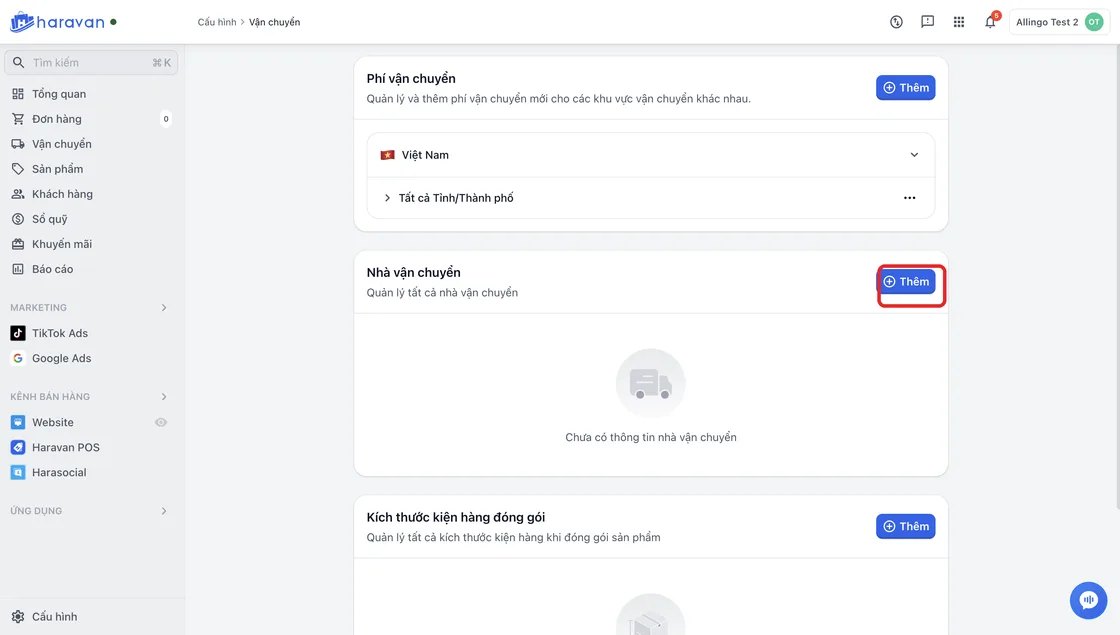
Step 2: Choose Add carrier
In the Carriers (Nhà vận chuyển) section, click Add (Thêm). A list of supported carriers appears.
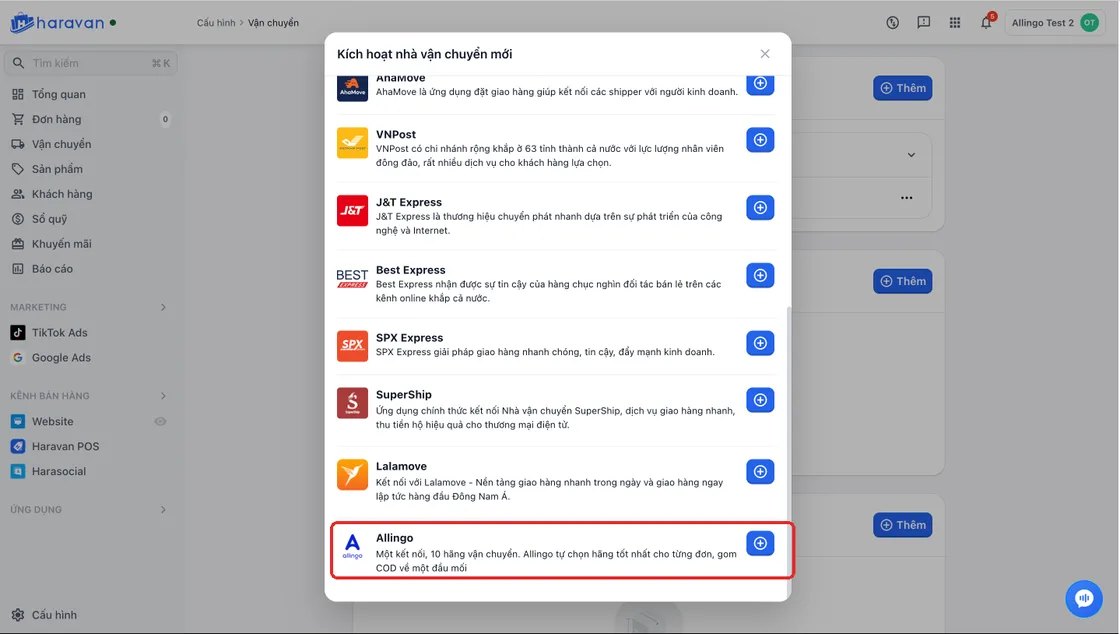
Step 3: Select Allingo
In the carrier list, select Allingo.
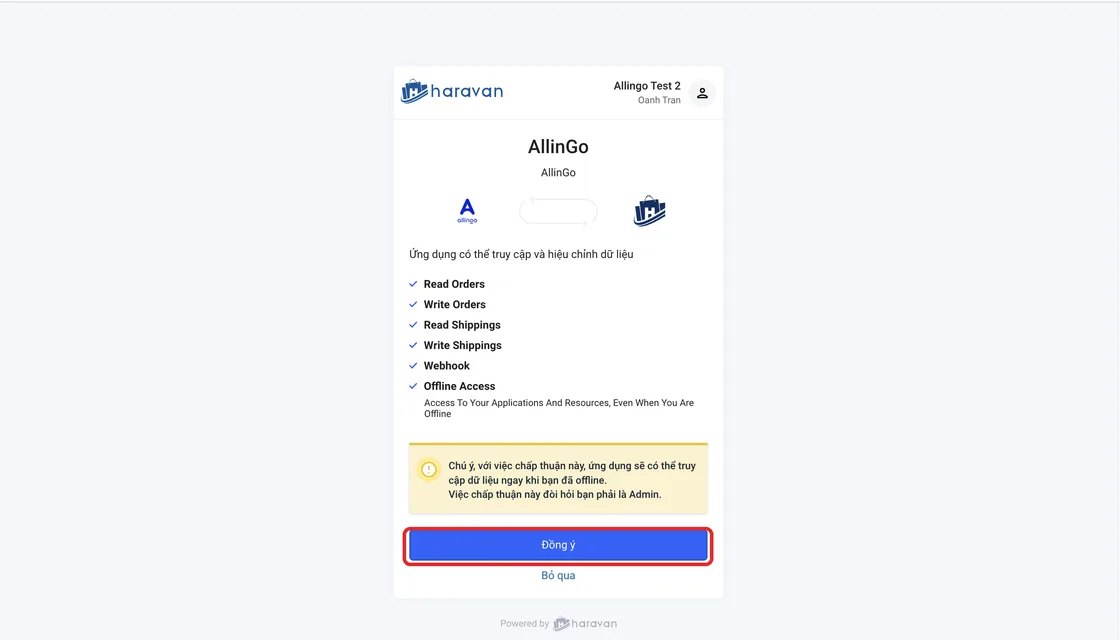
Step 4: Allow Allingo access
A window asking you to confirm Allingo’s access opens. Review it and click Agree (Đồng ý).
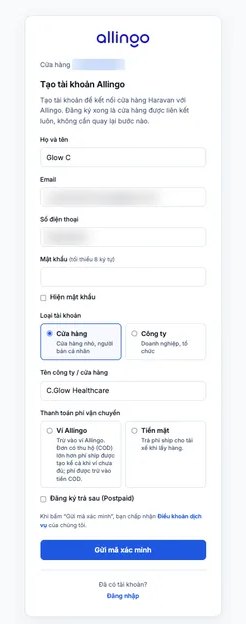
4.1. If you don’t have an Allingo account yet
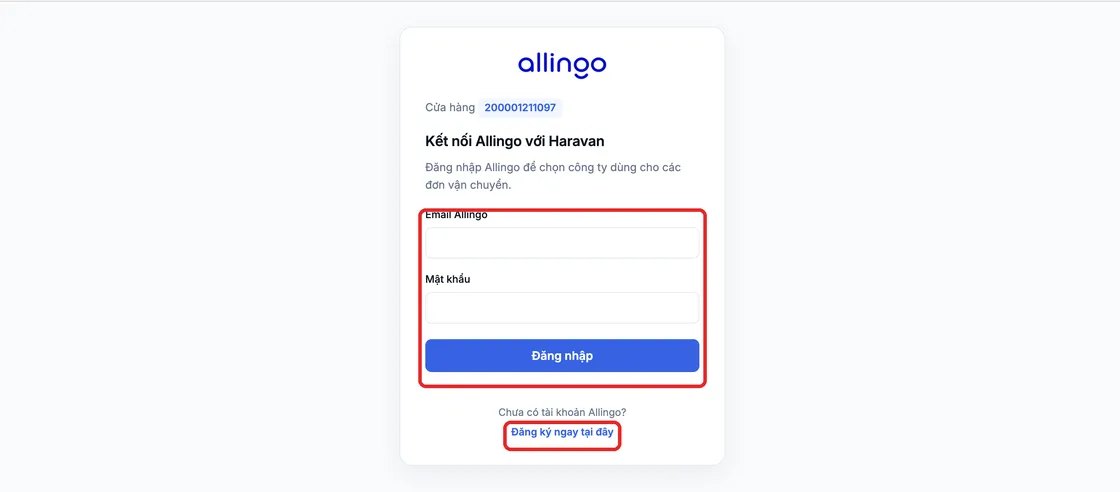
- Click Register here (Đăng ký ngay tại đây) and fill in the registration details.
- Enter the verification code sent to your phone number or email to finish.

4.2. If you already have an Allingo account
Log in with your existing Allingo account.
Step 5: Check the connection
Go back to Haravan and check that Allingo appears under Carriers in Settings → Shipping.
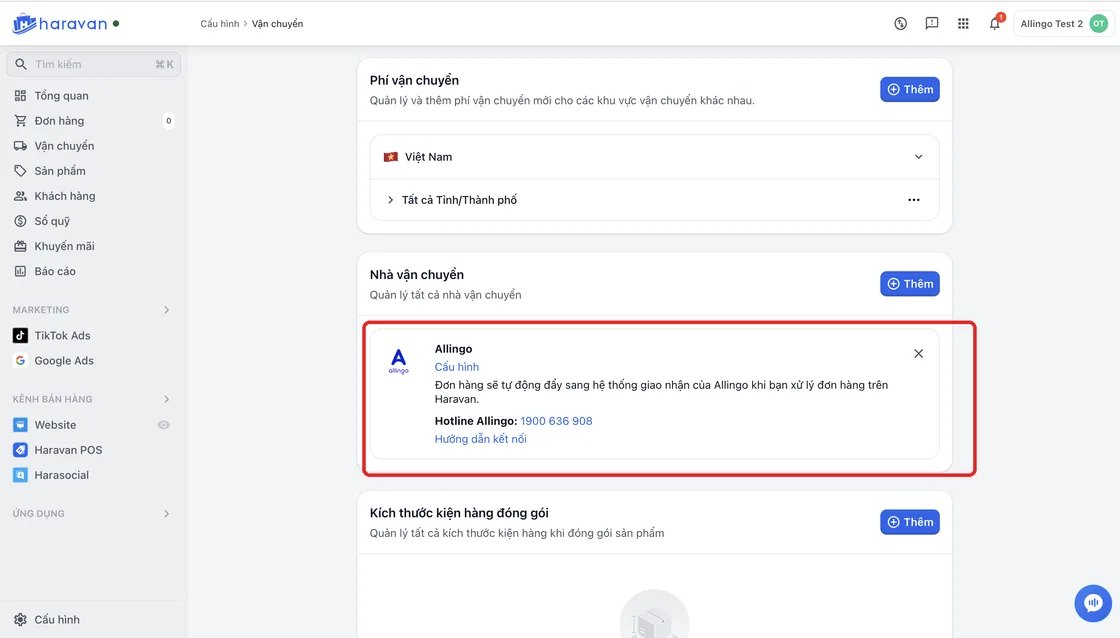
Once connected, you can choose Allingo when sending a shipping request for an order.
4.Ship with Allingo through Haravan
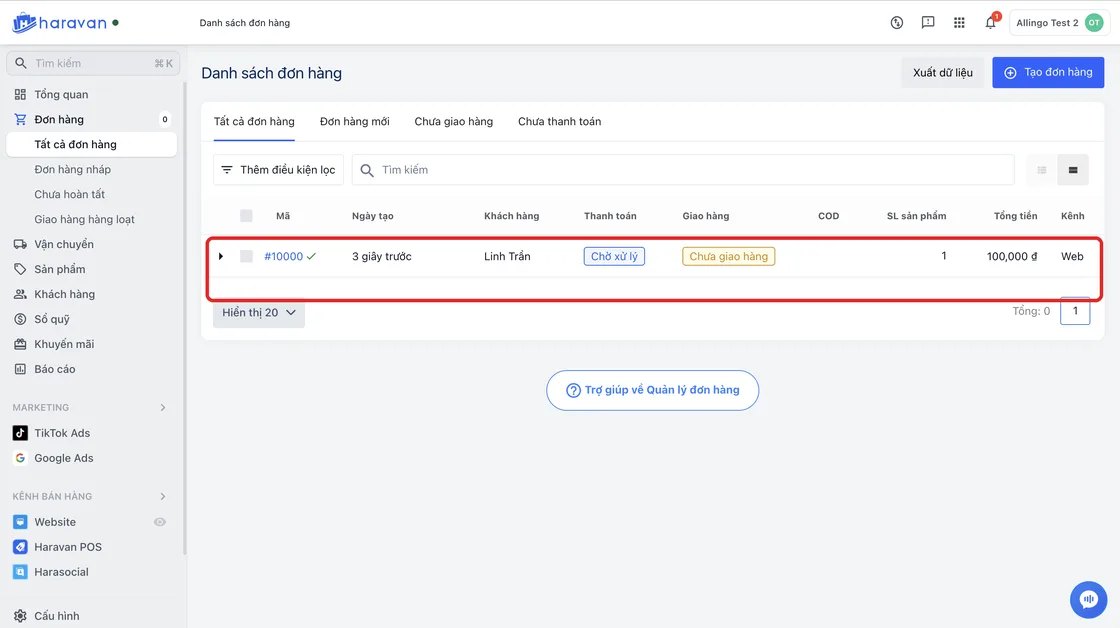
Step 1: Select the order to ship
In your Haravan admin, go to Orders (Đơn hàng) and select the order you want to ship.
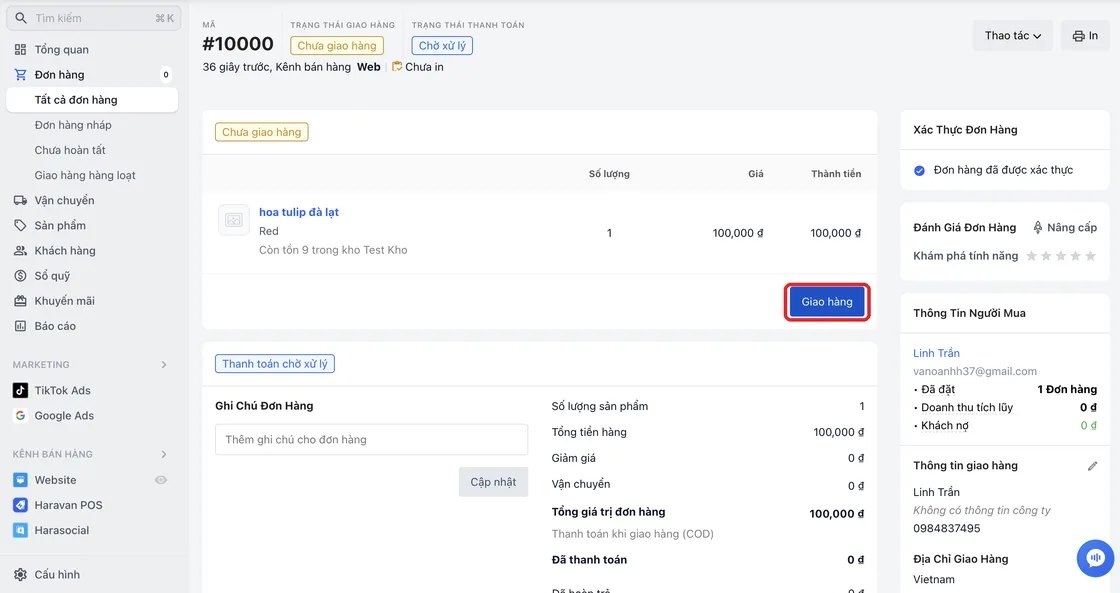
Step 2: Click Ship
In the order details, click Ship (Giao hàng).
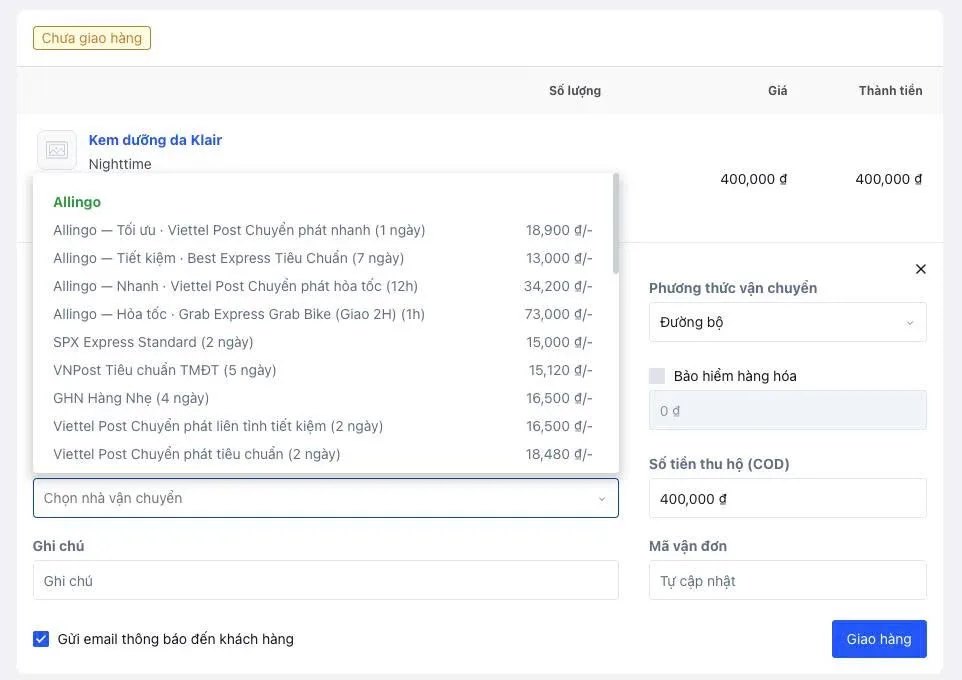
Step 3: Choose Allingo and your delivery goal
- In Ship with (Giao hàng bằng), choose the carrier Allingo.
- Pick the delivery goal that fits (Tiết kiệm, Nhanh or Tối ưu) and check the fee quoted for the order.
Step 4: Confirm the shipment
Click Ship to send the shipping request to Allingo.
When this is done, the system creates a shipment. You can follow the tracking code and delivery status right in Haravan.
5.Track your orders
On Haravan
Open Shipping (Vận chuyển) in Haravan to see the shipment code, tracking code, carrier and status of all shipments.
On Allingo
You can also track orders on Allingo with the account connected to Haravan: log in to Allingo and open Shipments (Vận đơn).
6.Cost
Each order shows its shipping fee when you create the shipment, so you can check it before clicking Ship. There are no setup, integration or monthly platform fees.
7.Why choose Allingo?
- One platform, many carriers: connect once to 10+ carriers (GHN, J&T, Viettel Post, SPX and more) and manage your shipments in one place instead of opening several apps.
- Choose the carrier by goal, per order: for each order, Allingo shows quotes from several carriers so you can choose Tiết kiệm, Nhanh or Tối ưu.
- More options when you need them: with several carriers in one place, you are not limited to a single carrier for every order.
Ready to connect Allingo on Haravan?
Connect once and send your Haravan orders to 10+ carriers, with the fee shown for every order before you ship.
Connect now →